Developer Docs
This page provides guidance for developers to get started with advanced use cases of modOpt.
Developing New Optimizers
If you are interested in using modOpt to implement new optimizers, refer to the New Optimizer Development section to get started. For benchmarking your newly implemented optimizer, see the Benchmarking section. The Educational Algorithms section contains several references for building gradient-based, gradient-free, and discrete optimization algorithms. Explore the Examples section for demonstration problems that show how to utilize the built-in educational algorithms.
Interfacing External Optimizers
All optimizers in modOpt must inherit from the abstract Optimizer class.
As a result, tools for checking first derivatives, visualizing, recording, and hot-starting
are automatically inherited by correctly interfaced external optimizers.
Every optimizer in modOpt is instantiated with a problem object, which should be derived
from the Problem or ProblemLite classes.
See the UML class diagram at the bottom of this page for
a quick overview of the Optimizer, Problem, and ProblemLite classes.
The Optimizer base class provides essential tools for recording,
visualization, and hot-starting an optimization.
The record attribute manages the systematic recording of the optimization, while the visualizer
attribute enables real-time visualization of the optimization process.
The Optimizer base class also implements a check_first_derivatives method
to verify the correctness of the user-defined derivatives in the provided problem object.
Subclasses of Optimizer must implement an initialize method that sets the solver_name and
declares any optimizer-specific options.
Developers are required to define the available_outputs attribute within the initialize method.
This attribute specifies the data that the optimizer will provide after each iteration
of the algorithm by calling the update_outputs method.
Developers must also define a setup method to handle any pre-processing of the problem data and
configuration of the optimizer’s modules.
The core of an optimizer in modOpt lies in the solve method.
This method implements the numerical algorithm and iteratively calls
the 'compute_' methods from the problem object.
Upon completion of the optimization, the solve method should assign a results attribute
that holds the optimization results in the form of a dictionary.
Developers may optionally implement a print_results method to override
the default implementation provided by the base class and
customize the presentation of the results.
Note
Since HDF5 files from optimizer recording are incompatible with text editors,
developers can provide users with the readable_outputs
option during optimizer instantiation to export optimizer-generated
data as plain text files.
For each variable listed in readable_outputs, a separate file is generated,
with rows representing optimizer iterations.
While creating a new optimizer, developers may declare this option so that
users are able to take advantage of this feature already implemented in
the Optimizer base class.
The list of variables allowed for readable_outputs is any
subset of the keys in the available_outputs attribute.
Developers may need to implement additional methods for setting up constraints, their bounds, and derivatives, depending on the API of the external optimizer. The external_libraries directory contains a variety of references for interfacing external optimizers with modOpt. These include QP solvers, convex optimizers, and general gradient-free and gradient-based nonlinear optimizers. For benchmarking a newly interfaced external optimizer against existing optimizers in the library, see the Benchmarking section.
Interfacing External Models or Modeling Frameworks
Lightweight interfaces to external models or modeling frameworks can be
built using the ProblemLite class.
For a basic demonstration and usage, refer to the ProblemLite section.
For more information on the class, see the ProblemLite page for developers.
For references on modeling interfaces built using ProblemLite, check out
JaxProblem
and CasADiProblem.
Developers can use the Problem class
to build more intrusive and flexible modeling interfaces.
For a basic demonstration and usage, refer to the Problem section.
For more information on the class, see the Problem page for developers.
For references on modeling interfaces built using Problem, check out
CSDLProblem,
CSDLAlphaProblem,
and OpenMDAOProblem.
Interfacing Test Problem Sets
Test problem collections can be interfaced with modOpt using the Problem or ProblemLite classes,
following the same methodology discussed in the section
Interfacing External Models or Modeling Frameworks above.
For reference, check out
CUTEstProblem,
an interface to the CUTEst test problem collection built using the Problem class.
UML class diagram for modOpt
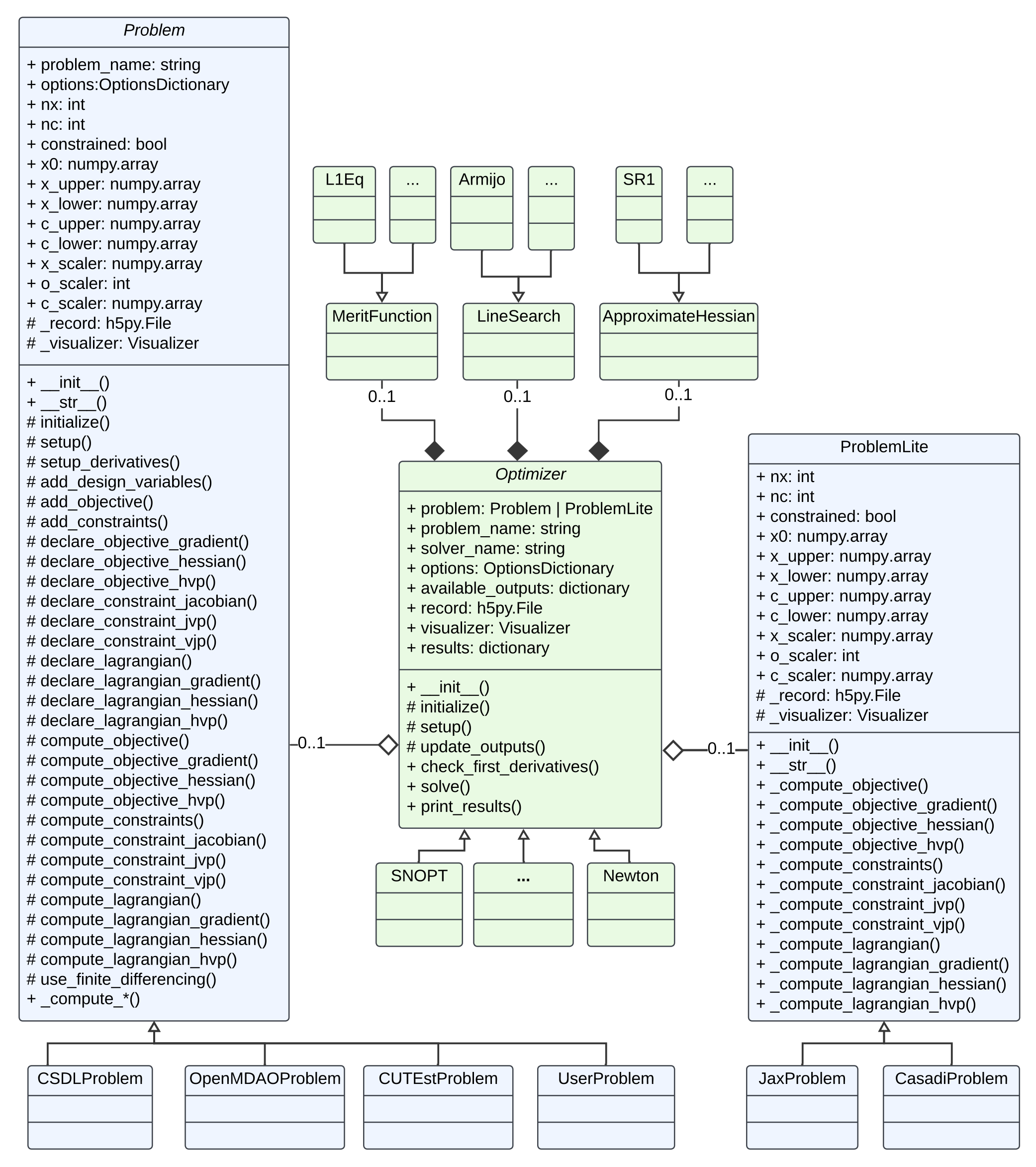
UML class diagram for modOpt